Legal Disclaimer
This security research was conducted exclusively on hardware owned by UploadSecurity for educational and research purposes. All analysis was performed in compliance with applicable laws and regulations.
The information provided in this article is intended for educational purposes only. UploadSecurity does not encourage or condone unauthorized access to computer systems or networks. Readers are responsible for ensuring their own compliance with all applicable laws before attempting any security research.
Certain sensitive values, including cryptographic keys, credentials, and device-specific identifiers, have been redacted from this publication to prevent misuse.
This research was disclosed to the vendor through their official security reporting channels.
Executive Summary
- Target: Wyze Cam Pan v3 — a consumer IoT security camera
- Objective: Determine how WiFi credentials are stored and protected
- Methodology: Static firmware analysis, binary reverse engineering, physical flash extraction
- Finding: WiFi credentials are encrypted using AES-128-CBC with per-device key derivation
- Assessment: The implementation demonstrates reasonable security practices for consumer IoT
Introduction
As IoT devices become increasingly prevalent in homes and businesses, understanding how these devices protect sensitive information is critical. WiFi credentials represent a particularly high-value target — compromise of these credentials can provide an attacker with persistent network access.
This research examines the Wyze Cam Pan v3, a popular consumer security camera, to understand the security mechanisms protecting stored WiFi credentials. Our analysis progressed through multiple phases, each building upon previous findings to develop a complete picture of the credential storage implementation.
Scope and Methodology
This research was conducted using the following methodology:
- Static Firmware Analysis: Extraction and examination of publicly available firmware update packages
- Binary Reverse Engineering: Decompilation and analysis of relevant binaries using Ghidra
- Physical Extraction: SPI flash dump from hardware we own to obtain runtime configuration data
- Cryptographic Verification: Implementation of discovered algorithms to verify findings
Phase 1: Static Firmware Analysis
Wyze publishes firmware updates publicly, enabling initial analysis without physical device access. We extracted the firmware package using standard tools:
$ binwalk -e recovery_wyzepan3.bin

DECIMAL       HEXADECIMAL     DESCRIPTION
--------------------------------------------------------------------------------
2162700       0x210000        Squashfs filesystem, little endian, version 4.0
...
The extracted filesystem revealed a standard embedded Linux environment with several binaries of interest:
| Binary | Purpose |
|---|---|
| iCamera | Primary camera application |
| encryption | Cryptographic utility for file encryption/decryption |
| assis | Assistant daemon handling OTA updates |
| libwyzeUtils.so | Shared library containing crypto functions |
| libwyzeUtilsPlatform.so | Platform-specific utility functions |
Initial Observations
During initial analysis, we identified a shell script that appeared to handle WiFi configuration:
#!/bin/sh
wifissid=$(cat /configs/.wifissid)
wifipasswd=$(cat /configs/.wifipasswd)

rewrite_config_value $wpaconf_file ssid "\"$wifissid\""
rewrite_config_value $wpaconf_file psk "\"$wifipasswd\""
This script reads credentials using cat, which initially suggested plaintext storage. However, static firmware analysis alone could not confirm whether these files contained plaintext credentials or whether decryption occurred elsewhere in the boot process. Further investigation was required to reach a definitive conclusion.
Phase 2: Identifying Cryptographic Components
String analysis of the relevant binaries revealed several cryptographic indicators:
$ strings system/lib/libwyzeUtilsPlatform.so | grep -i "encrypt\|key"
product_config_get_pub_key
product_config_get_log_encryption_key
product_config_get_ota_app_key
product_config_get_userdata_encryption_key
We also identified several embedded cryptographic values. These have been redacted but included:
- A 16-byte value consistent with AES-128 key length
- A 32-byte value consistent with AES-256 key length
- Additional hex-encoded values in the utility libraries
The presence of embedded cryptographic material in firmware is common in IoT devices. The security implications depend entirely on how these values are used — whether as default fallbacks, shared secrets, or per-device derivation inputs.
Phase 3: Physical Extraction
To obtain the actual runtime configuration and verify the encryption implementation, we performed physical hardware analysis on a device in our possession. This involved two key techniques: UART serial access and SPI flash dumping.
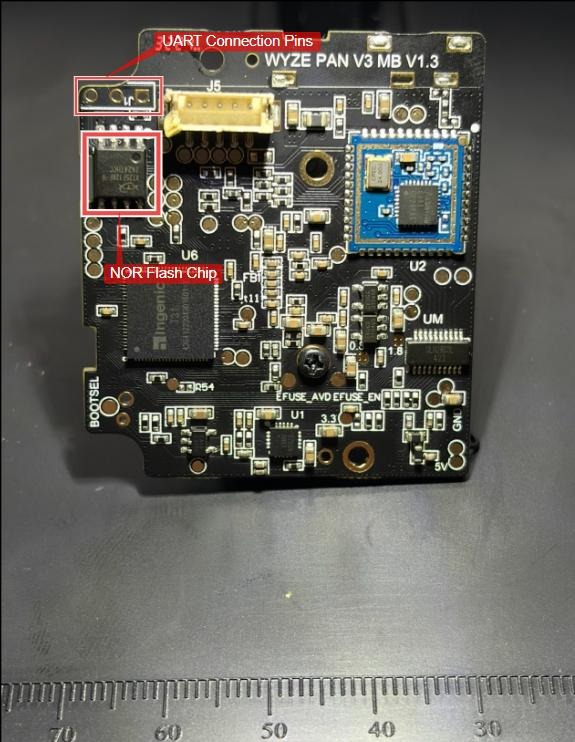
UART Serial Access
UART (Universal Asynchronous Receiver-Transmitter) provides serial console access to embedded devices, allowing observation of boot logs and potential shell interaction. We identified the UART test points on the board and connected using a USB-to-serial adapter.
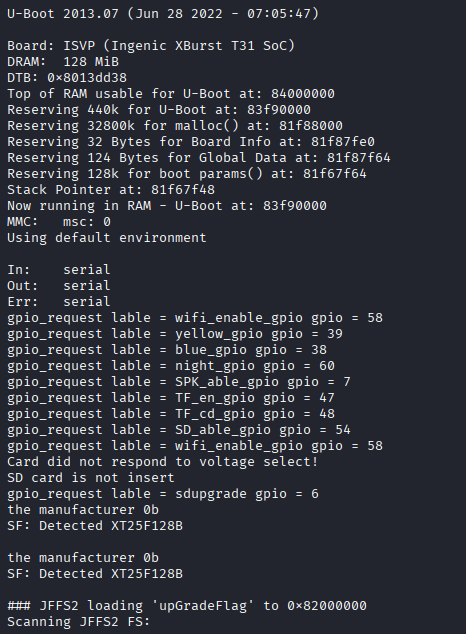
We connected to the UART interface at 115200 baud (8N1) using a USB-to-serial adapter. This provided access to the boot console output.
UART access provided valuable boot log output, revealing the partition layout and system initialization process. However, shell access was password-protected, necessitating the SPI flash approach for data extraction.
SPI Flash Extraction
The device's firmware and configuration data are stored on an SPI (Serial Peripheral Interface) flash chip. SPI flash is non-volatile memory commonly used in embedded devices to store bootloaders, firmware, and configuration data. Direct extraction of this chip provides access to all partitions, including those containing encrypted credentials and device-specific keys.
The extraction process typically involves:
- Identify the chip — Locate the SPI flash on the PCB and identify its model number to determine pinout and capacity
- Connect to the chip — Using either a SOIC test clip (non-destructive) or by desoldering the chip entirely
- Read with a programmer — Tools like a CH341A programmer, FlashROM, or a Bus Pirate can read the chip contents
- Dump the contents — Extract the full flash image as a binary file for analysis
For this research, we extracted the full 16MB flash contents and used partition offsets identified from the UART boot logs to carve out individual partitions for analysis.
Partition Layout
The UART boot logs revealed the complete partition structure:
mtdparts=jz_sfc:320K(boot),2112K(fit),6784K(rootfs),6784K(rback),320K(cfg),64K(oem)

# Partition Offsets:
boot   @ 0x000000  (320K)  - Bootloader
fit    @ 0x050000  (2112K) - Kernel and ramdisk (FIT image)
rootfs @ 0x260000  (6784K) - Primary filesystem
rback  @ 0x900000  (6784K) - Recovery backup
cfg    @ 0xFA0000  (320K)  - Configuration storage
oem    @ 0xFF0000  (64K)   - Device-specific data
The cfg partition, formatted as JFFS2, contained the actual configuration file:
[SETTING]
ssid_enc=1
pass_enc=1
password=[REDACTED - Base64 encoded encrypted data]
ssid=[REDACTED - Base64 encoded encrypted data]

[NET]
bindOk=1
p2pid=[REDACTED]
The configuration file includes explicit ssid_enc=1 and pass_enc=1 flags, confirming that WiFi credentials are stored in encrypted form. The actual credential values are Base64-encoded ciphertext, not plaintext.
Phase 4: Reverse Engineering the Decryption Process
With confirmation that encryption was in use, we focused on understanding the decryption implementation. Using Ghidra, we analyzed the relevant functions in libwyzeUtils.so and libwyzeUtilsPlatform.so.
Function 1: wyze_decrypt_string
This is the high-level decryption function that handles encrypted strings such as WiFi credentials.
int wyze_decrypt_string(char *input, char *output, int output_len) {
    unsigned char key[16];
    unsigned char iv[16];

    // Retrieve device-specific encryption key and IV
    result = product_config_get_userdata_encryption_key(
        key, 0x10,    // 16-byte key
        iv, 0x10      // 16-byte IV
    );

    if (result == 0) {
        // Base64 decode the input
        decoded = wyze_base64_decode(input, &decoded_len);

        // AES-128-CBC decryption
        result = wyze_aes_decrypt(decoded, output, key, iv, decoded_len);
    }
    return result;
}
This function revealed the decryption pipeline: Base64 decode → AES decrypt. It confirmed credentials ARE encrypted and showed us which function handles key derivation (product_config_get_userdata_encryption_key). The 16-byte parameters indicated AES-128 encryption.
Function 2: product_config_get_userdata_encryption_key
This function implements the key derivation — the critical piece for understanding how encryption keys are generated.
int product_config_get_userdata_encryption_key(char *key, int key_len,
                                                 char *iv, int iv_len) {
    unsigned char pub_key_buffer[256];
    unsigned char hash_output[32];

    // Retrieve device-specific public key
    result = product_config_get_pub_key(pub_key_buffer, 0x100);

    if (result == 0) {
        // SHA256 hash of the 256-byte buffer
        wyze_sha256_hash(pub_key_buffer, hash_output, 0x100);

        // First 16 bytes become the AES key
        memcpy(key, hash_output, 16);

        // Next 16 bytes become the IV
        memcpy(iv, hash_output + 16, 16);
    }
    return result;
}
This was the critical discovery. The encryption key is NOT hardcoded — it's derived from a device-specific pub_key via SHA-256. The hash is split: first 16 bytes become the AES key, next 16 bytes become the IV. The 0x100 (256) parameter indicated the pub_key buffer is padded to 256 bytes before hashing.
Function 3: product_config_get_pub_key
This function retrieves the device-specific public key from loaded configuration.
bool product_config_get_pub_key(void *output) {
    // Check if config is loaded (HLHL magic = 0x4C484C48)
    if (config_magic == 0x4C484C48) {
        // Copy pub_key from config structure
        memcpy(output, &config_pub_key, strlen(&config_pub_key) + 1);
        return false;  // success
    }
    return true;  // failure
}
The pub_key is stored in a configuration structure marked with the "HLHL" magic header (0x4C484C48). This told us what to search for in the flash dump. The function also confirmed pub_key is a null-terminated string, not binary data.
Function 4: product_config_init
This function loads the device configuration from flash storage at boot.
int product_config_init(void) {
    // Open the config partition
    fd = open("/dev/mtdblock5", O_RDONLY);

    // Read 396 bytes (0x18c) into config structure
    read(fd, &config_buffer, 0x18c);

    // Verify HLHL magic header
    if (config_buffer.magic == 0x4C484C48) {
        // Config loaded successfully
        // pub_key is at offset 0x78 within this structure
    }
    close(fd);
}
This revealed the exact location of the device configuration: /dev/mtdblock5 (the OEM partition). The structure is 396 bytes with a "HLHL" magic header for validation. Most importantly, it told us the pub_key is located at offset 0x78 (120 bytes) from the start of the HLHL header.
Function 5: wyze_aes_decrypt
The low-level AES decryption wrapper that interfaces with OpenSSL.
int wyze_aes_decrypt(char *ciphertext, char *plaintext,
                      uchar *key, uchar *iv, int len) {
    AES_KEY aes_key;

    // Set up AES-128 decryption key (0x80 = 128 bits)
    AES_set_decrypt_key(key, 0x80, &aes_key);

    // Perform CBC decryption
    AES_cbc_encrypt(ciphertext, plaintext, len, &aes_key, iv, AES_DECRYPT);
}
This confirmed the exact algorithm parameters: AES-128-CBC (the 0x80 = 128 bits). It uses OpenSSL's standard AES implementation, which meant our Python decryption code could use PyCryptodome's compatible implementation.
Key Derivation Architecture
Combining insights from all analyzed functions, we mapped the complete key derivation flow:
Phase 5: Verification
To verify our analysis, we implemented the discovered key derivation and decryption process. The device-specific pub_key was extracted from the OEM partition of our flash dump.
Locating the Device Key
Using the information from our reverse engineering, we searched the SPI dump for the HLHL magic header:
$ grep -abo "HLHL" flash_dump.bin
16711680:HLHL

# 16711680 = 0xFF0000 (OEM partition offset)
# pub_key is at offset 0x78 (120 bytes) from HLHL

$ dd if=flash_dump.bin bs=1 skip=$((16711680 + 120)) count=256 | xxd
00000000: 776d 6259 6658 3543 6c65 6c58 2b4c 6237  wmbYfX5ClelX+Lb7
00000010: 546f 4262 3652 6e31 514f 4174 494f 5a43  ToBb6Rn1QOAtIOZC
...
000000b0: 0000 0000 0000 0000 0000 0000 0000 0000  ................
Decryption Implementation
import hashlib
import base64
from Crypto.Cipher import AES

# Device-specific pub_key from OEM partition (256 bytes with null padding)
pub_key_bytes = [REDACTED - 256 bytes extracted from flash dump]

# Derive key and IV via SHA-256 (matching the firmware's implementation)
sha256_hash = hashlib.sha256(pub_key_bytes).digest()
aes_key = sha256_hash[:16]   # First 16 bytes
iv = sha256_hash[16:32]      # Next 16 bytes

# Encrypted SSID from .user_config
encrypted_ssid = base64.b64decode([REDACTED])

# AES-128-CBC Decryption
cipher = AES.new(aes_key, AES.MODE_CBC, iv)
decrypted = cipher.decrypt(encrypted_ssid)

# Result: Successfully recovered plaintext SSID
The implementation successfully decrypted both the SSID and password from our test device, confirming the accuracy of our reverse engineering analysis. The decrypted values matched the actual WiFi credentials configured on the device.
The breakthrough came from understanding that the SHA-256 hash must be computed over the full 256-byte padded buffer, not just the visible string portion of the pub_key.
Security Assessment
Implementation Strengths
| Aspect | Assessment |
|---|---|
| Encryption Algorithm | AES-128-CBC — industry standard symmetric encryption |
| Key Derivation | Per-device keys derived from unique device identifier |
| Key Storage | Device key stored in separate OEM partition |
| No Shared Secrets | Credentials from one device cannot decrypt another |
Attack Complexity
Extracting WiFi credentials requires:
- Physical access to the target device
- Hardware tools to dump SPI flash
- Knowledge of the key derivation algorithm
- Extraction of the device-specific pub_key
This represents a significantly higher barrier than plaintext storage and is consistent with reasonable security practices for consumer IoT devices.
Additional Findings
During our analysis, we also examined the encryption binary and its usage:
$ strings system/bin/assis | grep "encryption -"
encryption -d /tmp/img -f /tmp/Upgrade.tar -k %s
encryption -e %s -f %s -k %s
The encryption binary is used for OTA firmware updates. However, since:
- Wyze publishes unencrypted firmware publicly
- Firmware images are cryptographically signed (RSA-2048)
The encryption key for OTA updates does not represent a significant security risk, as firmware integrity is protected by the signature verification.
Conclusion
Our analysis confirms that Wyze Cam Pan v3 implements reasonable security measures for WiFi credential storage. The use of per-device key derivation means there is no universal key that would allow mass credential extraction.
While credentials can theoretically be recovered with physical access, the complexity involved is appropriate for the device's threat model. This implementation represents a positive example of IoT security practices in the consumer market.
Tools and Techniques
Key Takeaways
For Security Researchers
- Static firmware analysis provides initial insights but may not reveal the complete picture
- Physical extraction and runtime analysis are often necessary for definitive conclusions
- Trace complete code paths through multiple functions — the key insight often comes from connecting several pieces
- Pay attention to buffer sizes and padding — the difference between hashing a string vs. a padded buffer was the breakthrough
- Verify findings through implementation before drawing conclusions
For IoT Manufacturers
- Per-device key derivation significantly improves credential security
- Separating device-specific secrets into dedicated partitions is good practice
- Firmware signing provides integrity protection independent of encryption
- Defense in depth remains essential — no single control is sufficient
References
- OWASP IoT Security Verification Standard
- NIST Guidelines for IoT Device Security
- CWE-256: Plaintext Storage of a Password
- CWE-321: Use of Hard-coded Cryptographic Key